Ask Irisel | Vol. 07: Where to Start With AI in Your Business
If you’re here to build something iconic, you’re in the right place. Subscribe by clicking here for weekly insights on brand building, psychology, and influence.
October’s Ask Irisel is here!
If you have a question about building your Personal Brand, make sure to send it to me before next month's issue: iriselaesteria.com/askirisel.
Let's begin.
Ask Irisel | Vol. 07: Where to Start With AI in Your Business
This month’s issue is focused on AI: where to start with it in your business, and how to use it as a tool without it replacing you.
Two weeks ago we talked about AI slop and what the landscape of AI content looks like right now. This month, Ask Irisel is covering how to actually use AI as a tool in your business.
Q1. From L: “Hey Iris, do you use AI to help you write your content? I tried to have AI help me write this script, but then it sounded really inauthentic, and I ended up having to just write it myself. I know you talk a lot about using AI as a tool to help you make your workflows faster, but how do I use AI without it completely changing how I sound?”
Yes! I do use AI to help me write my content.
I have over 35 pages of detailed brand guidelines that define my brand voice, my writing style, my ICA, my content formulas, my tangible target demographic details, and hundreds more pages of SOPs (systems and operating procedures) that tell any AI I use how to write content with my exact writing style.
I’m not saying you need all of this in order to use AI to help you write your content. But what you need to understand is: your AI is only ever able to write as well as you give it direction.
Your AI fills in the gaps of its knowledge with whatever already exists for it to find, and with its own knowledge base. Which is why it can sound like bland AI: repetitive, using the same phrases over and over again, weird use cases of the word “the,” a lot of “it’s not this, it’s that,” em dashes in every second sentence, etc.
And the reason it does that is because that’s all it knows.
So if your writing sounds bad, or very “AI,” it’s because you haven’t taught it how to write good content that actually sounds like you. Think of it like teaching a child. It will mimic you as best as it can, and if you’ve only shown it two sentences of how you talk, it fills in the rest with what's floating around online.
So if you notice your scripts aren’t sounding great, first get clear on what sounds bad:
Is it the outline?
Is it using specific phrases it shouldn’t use?
Does it know what your actual brand voice sounds like?
Does it have any reference material that actually sounds like you? Do you have transcripts of previous video scripts it can analyze to see how you speak on camera?
When I say I have over 35 pages of my own brand guidelines, it’s because I’ve taken the time to train my AI. I have it go through my highest performing content, dissect it with me, then put everything on file, so as it writes more for me, it knows how I want it to sound and the key phrases I use. And I’ve taught it how to ask me questions, so that the key point of every article, every script, every carousel sounds exactly like me.
A few things that will make the biggest difference for you right away:
Be as specific as possible. Even if you don’t know exactly what you want to say yet, think about what you want to put there. Don’t be afraid to use brackets, or explain what you’re trying to say, and let AI help fill in the blanks.
Be clear with your directions. Don’t let AI paraphrase what you’re saying. Tell it to use your exact words as much as possible.
Tell your AI to ask you questions to fill in the blanks. A lot of the time you have knowledge within you that you don’t recall in the moment you’re creating content. But if you tell your AI to grill you with questions, to help it close the gaps in its knowledge, it will write more like you (especially if you remember to tell it not to paraphrase).
And I’ll leave you a few resources to help you create a base brand kit you can feed into your AI:
What’s actually inside my Brand Codex, and where to start with Claude.
How to build your personal brand step by step, using Claude.
Content Fluff, from my Mercury retrograde piece: how to tell when a post is using a lot of words to say very little, so you can hear it in what your AI writes for you before your audience does.
Q2. From A: “Irisel! I’m seeing all these incredible ways to use AI and I know that it’s the next step for me and my business to master using AI as a tool. But, I don’t even know where to start. I’m not a very techy person. It would help give me ideas if you could tell me where you use AI in your business? What do you use it for? What can I think about to help me figure out where I should be using AI in my business?”
Of course A :)
Well, first off, before we begin, it’s important for me to note that I am very invested in using AI for my business. And some of the ways I use AI, I wouldn’t necessarily recommend a client to use it for.
I tell you this because I don’t want you to spend 6 months vibe coding an app if it’s not actually the best fit for you. So after you read my response, make sure to take a look at my response for P (the question after yours) to help you determine when something should be set aside as a project to fulfill using AI, and when maybe it’s better to do it yourself.
Where I use AI:
I’m going to break these up into the different departments of my business.
Content
Planning my blogs for the quarter. My AI reads last quarter’s topics and themes, and takes a worksheet I fill out to help me determine the theme. Then it helps me define my quarterly theme and separate my content ideas into separate weekly blog articles.
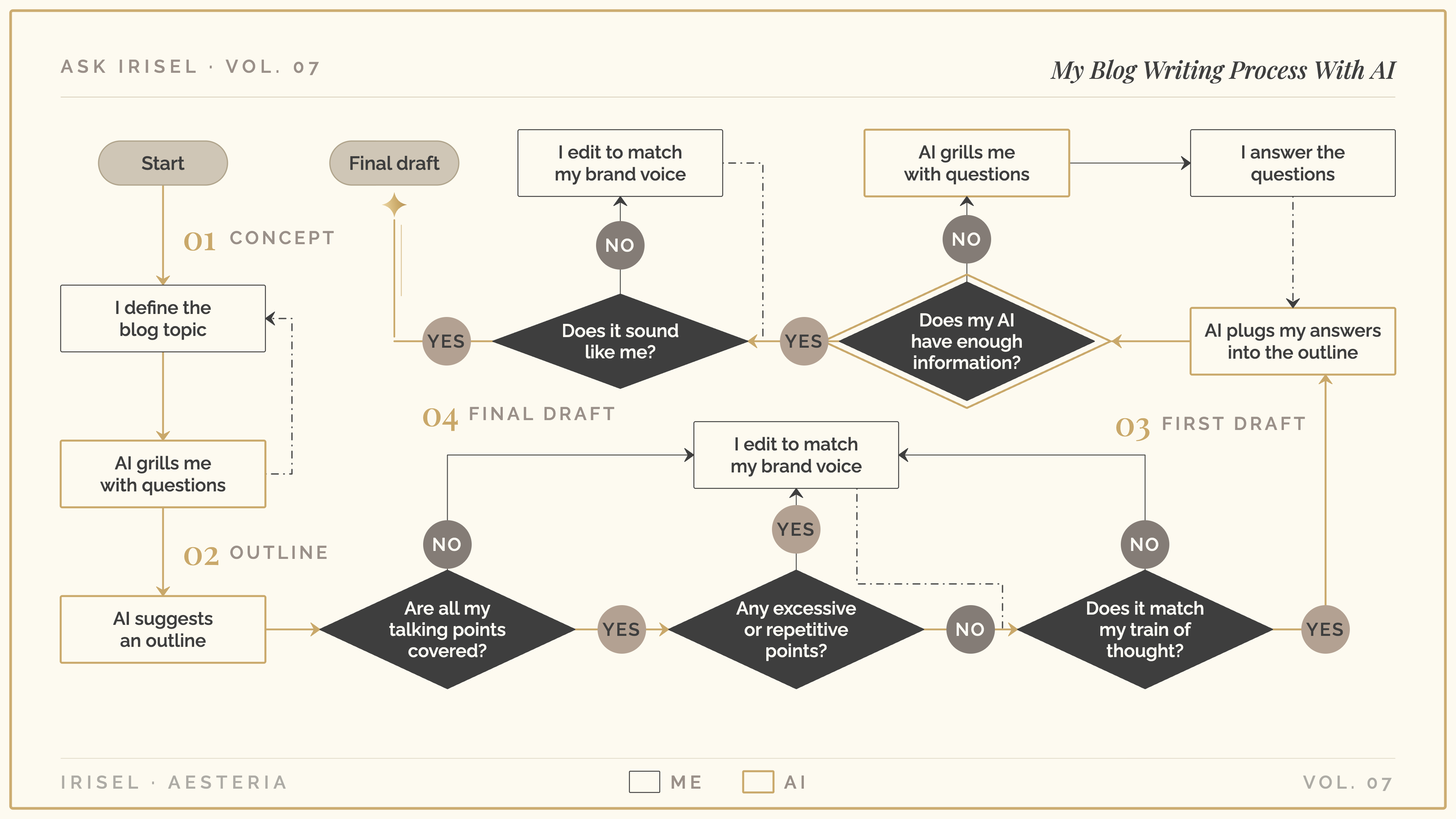
Writing my blog. I’ve created a process with my AI models, where I go through a series of questions to collect all my thought leadership around a given topic. I work with my AI to create an outline, and then I have trained my AI to take the responses to my thought leadership and plug them into the outline we’ve created. My AI then goes through all my brand voice and content creation SOPs so that it writes in my exact language. So in essence: I fill out a worksheet answering questions on a given topic, the AI suggests an outline, I optimize the outline to cover the talking points I want to talk about, then the AI plugs my answers from my worksheet into the outline to create the draft. From there I edit. This is how I keep my ideas and brand voice fully embedded in any AI content I create.
Repurposing my blog. My trained AI model takes my blog and turns it into my weekly email, following my exact processes so that the message isn’t removed and it’s not paraphrased. I’m currently optimizing my Blog → Facebook repurposing process to create posts that promote my blog the same way, and will be moving into optimizing my carousel strategy as well.
Monthly analytics. My AI pulls my analytics from each of my social media accounts, writes an analysis according to my desired metrics, and helps me determine which topics, writing styles and types of content I should create more of, and what I should create less of.
Design
Blog diagrams and visuals. I add comments to my blogs, indicating where a strong visual diagram would be. My AI takes my written word and translates it into ideas for visual communication around that given idea. From here I refine with my AI model to create charts and diagrams using my design guidelines, so I have visual diagrams I can use on my YouTube channel, my blogs, my Facebook posts etc.
Design templates. I design each template once with my AI, inside my brand guidelines (my fonts, my colors, my layouts). Then for every new blog cover, email header, social media post or carousel, my AI updates the photo and the text inside that template. So every graphic matches my brand, and I’m not rebuilding a design from scratch every week.
AI photos. I trained an AI photo model on my own likeness, and I keep my brand’s photo guidelines on file (my outfits, my colors, my jewelry, my hair). So when I need a new photo for a cover or a post, I can create one that looks like me and my brand without booking a full shoot.
Video
Mapping out my YouTube scripts. I talk through the idea for a video, and my AI helps me map it into a script outline: the hook, the talking points and the order they go in. So I sit down to record knowing exactly what I’m covering which helps reduce my editing time since I have less material to cut through.
Animated text templates for my YouTube edits. I design how I want my on-screen text and graphics to look and move, then my AI codes them into After Effects templates I can drop into any video. I still make every cut myself. My AI only builds the reusable pieces, so my videos look consistent without me animating each one by hand.
Apps
Cue. Cue is my content creation app that I built from the ground up with AI. It’s the app where I plan, draft and schedule my blog, my emails and my social posts in one place, with my analytics next to them. No content tool out there followed my writing process, so I built one that does, and my trained AI works inside it with me.
HQ. HQ is my project management app, where I store all my projects, track my time spent working, and plan out my days, weeks, months, quarters, and years. I built out the app so I could have more direct control and management over how much time I spend on each part of my business, which gives me a more precise timeline for every project.
Mise. My meal planning app. I used AI to help me build a recipe database of all my favourite recipes, along with a calendar and grocery ordering system, to plan my meals for the week. It’s not “technically” part of my business, but taking care of my health is what keeps me energized enough to show up consistently for my business, and building out this app has reduced the amount of time and energy required of me to meal plan and order groceries each month.
Operations
My SOPs (systems and operating procedures). Every time I make a decision about how something in my business gets done, I have trained my AI to turn it into an SOP for that process. So the next time, my AI follows the process without me re-explaining it, and I personally require less thinking and effort to get done the things that happen often. I’ve trained my AI to think like me and document my process, so anytime I do something, it improves each time.
To figure out where you should be using AI in your business, start with the things you already do the same way every time, and the parts of your brand you’ve already defined. AI is an excellent tool when you can give it exact guidelines to follow.
Q3. From P: “Hi Irisel, I’ve been using AI in my business for a few months now and honestly I can’t tell if it’s making my work better or just making me faster at producing more low quality content. How do I know if I’m using it productively?”
Let’s start with how to determine when you should be using AI to help you.
There's 2 signs to indicate if you should be using AI for a specific task:
You do something, and it feels like it takes longer, or requires more effort, than it should.
You do something on repeat, the exact same way, every single time. Can be every quarter, every month, every week, every year.
If you want help spotting those in your own business, Finding Bottlenecks in Your Business walks you through a simple systems audit to find where your time and energy are leaking.
Think of AI as having an employee on your team. IE: A virtual assistant, a design assistant, a support strategist, a support copywriter.
When you think of it as leading a team, it’s easier for you to recognize the importance of executive management: know what the priority is, and then keep to that priority.
AI can do a lot, and it’s going to recommend it does a lot. But you need to know if it should do something, or if it shouldn’t.
You use AI to make your workflows more efficient, and to decrease your creation time (and your load). So try to limit how much thinking is required: if you can think through it once, create your brand guidelines, your content guidelines, or whatever guidelines and SOPs you need, then you can train it to follow those guidelines. So the things you do on repeat require less push and pull from you, or from another member of your team.
Have Questions About Using AI in Your Business?
If reading this brought up a question of your own, about AI, your content, or where to start, send it to me at iriselaesteria.com/askirisel for November's Ask Irisel issue.

For founders ready to be seen at their full capacity. Subscribe to The Aesteria Codex by clicking here.